Build a RAG App from Scratch
Introduction
Large language models (LLMs) like Llama or GPT are impressive, but they have two well-known weaknesses. First, they only know what they were trained on, so they know nothing about your private documents, your company wiki, or your personal portfolio. Second, when they don't know something, they sometimes make up an answer that sounds confident but is wrong. This is called hallucination.
Retrieval-Augmented Generation, or RAG, is the most popular way to fix both problems. Instead of hoping the model already knows the answer, we first look up the relevant information from our own data, then hand that information to the model together with the question. The model's job becomes simple: read the provided context and answer from it.
In this tutorial we will build a complete RAG pipeline from scratch. The goal is practical: we will collect information about a person from their personal website, store it in a free online vector database, and then ask natural-language questions such as "What projects has this person built?" or "Which programming languages do they use?" The answers will come from a free hosted LLM.
Everything here uses free tiers and open source tools. Free-tier limits and model names change over time, so always check each provider's pricing and docs page.
What You Will Learn
- What RAG is and why it works
- What embeddings and vector databases are
- Why we split text into chunks
- How to call the Qdrant Cloud REST API to create a collection, store vectors and search them
- How to scrape a web page
- How to send retrieved context to a free LLM on Groq
- How to fix the most common errors you will meet along the way
Part 1: The Concepts Behind RAG
Before writing code, it helps to understand the four building blocks.
1. Embeddings: turning meaning into numbers
Computers cannot compare the meaning of two sentences directly. But they can compare lists of numbers. An embedding model reads a piece of text and outputs a list of numbers (a vector) that represents its meaning. The model we use, all-MiniLM-L6-v2, outputs 384 numbers per text.
The key property is that texts with similar meaning get vectors that are close together. "How long does delivery take?" and "Shipping takes 3-5 days" share almost no words, yet their vectors are close. That is why this is called semantic search: it matches on meaning, not on exact keywords.
2. A vector database: storing and searching vectors
A vector database stores vectors together with extra data (called a payload) and can quickly answer the question: "which stored vectors are closest to this one?" We use Qdrant, an open source vector database that offers a free hosted cluster and a simple REST API.
A cluster is simply the server that runs Qdrant for you. Your Python script is only a client that sends HTTP requests; the cluster receives them, stores the vectors and runs the searches. When you create a free cluster you get a URL (the address of your server) and an API key (the password).
3. Chunking: why we split text
If you embed an entire web page as one vector, all its topics get blurred into one average meaning, and searching it becomes imprecise. So we split long text into smaller pieces called chunks (here about 150 words), each with its own vector. We also let chunks overlap slightly so a sentence sitting on a boundary doesn't lose its context.
4. The LLM: writing the final answer
The LLM receives the user's question plus the most relevant chunks and writes a natural answer. We use Groq, which hosts open models such as Llama and exposes an OpenAI-compatible API. We instruct the model to answer only from the provided context and to say "I couldn't find it" otherwise. This instruction is what keeps hallucination down.
Part 2: The Architecture
The pipeline has two phases.
Ingestion (run once):
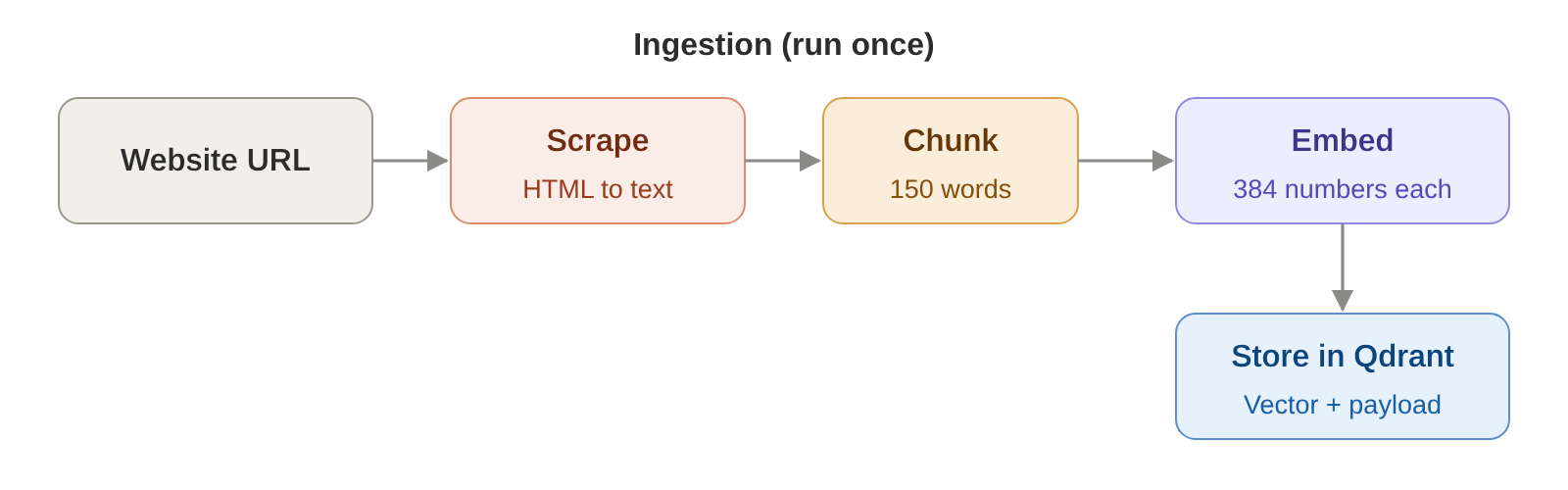
This part runs once. Think of it as filling the library before anyone comes to borrow a book. The website goes through a scraper and ends up as small chunks. Each chunk becomes 384 numbers and is saved in Qdrant, along with the original text and where it came from.
Question answering (run every time someone asks):
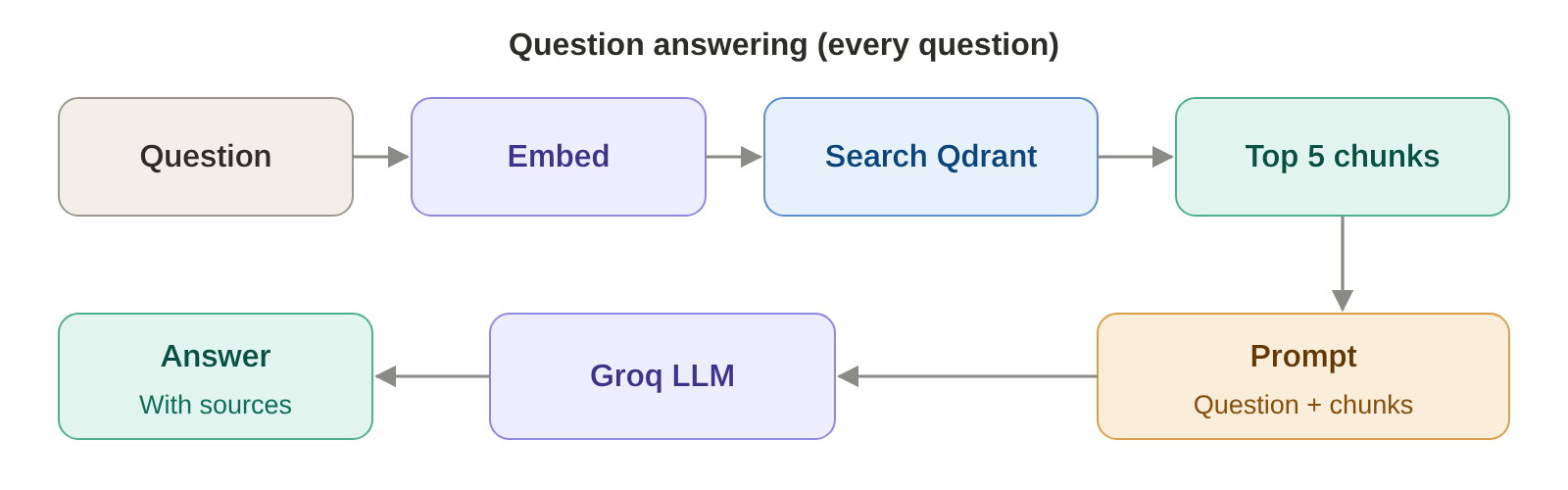
This part runs for every question. The question is turned into numbers with the same model. Qdrant finds the five chunks that sit closest to it. Those chunks and the question go into one prompt, and Groq writes the answer from them. The model never has to guess, because we hand it the facts.
There are four API calls in total: create the collection, store the points, search, and ask the LLM.
| Piece | Tool | Role |
|---|---|---|
| Vector database | Qdrant Cloud (free cluster) | Stores and searches vectors |
| Embeddings | sentence-transformers (local) | Turns text into vectors |
| Data source | A personal website | The knowledge |
| LLM | Groq (free tier) | Writes the answer |
A note on why we need a separate embedding library: Qdrant only stores and compares numbers, and Groq does not provide embeddings. Something has to convert text to vectors, and that is the job of sentence-transformers. The same model must be used for both documents and questions, and its output size (384) must match the vector size configured in the Qdrant collection.
System Architecture: Who Talks to Whom
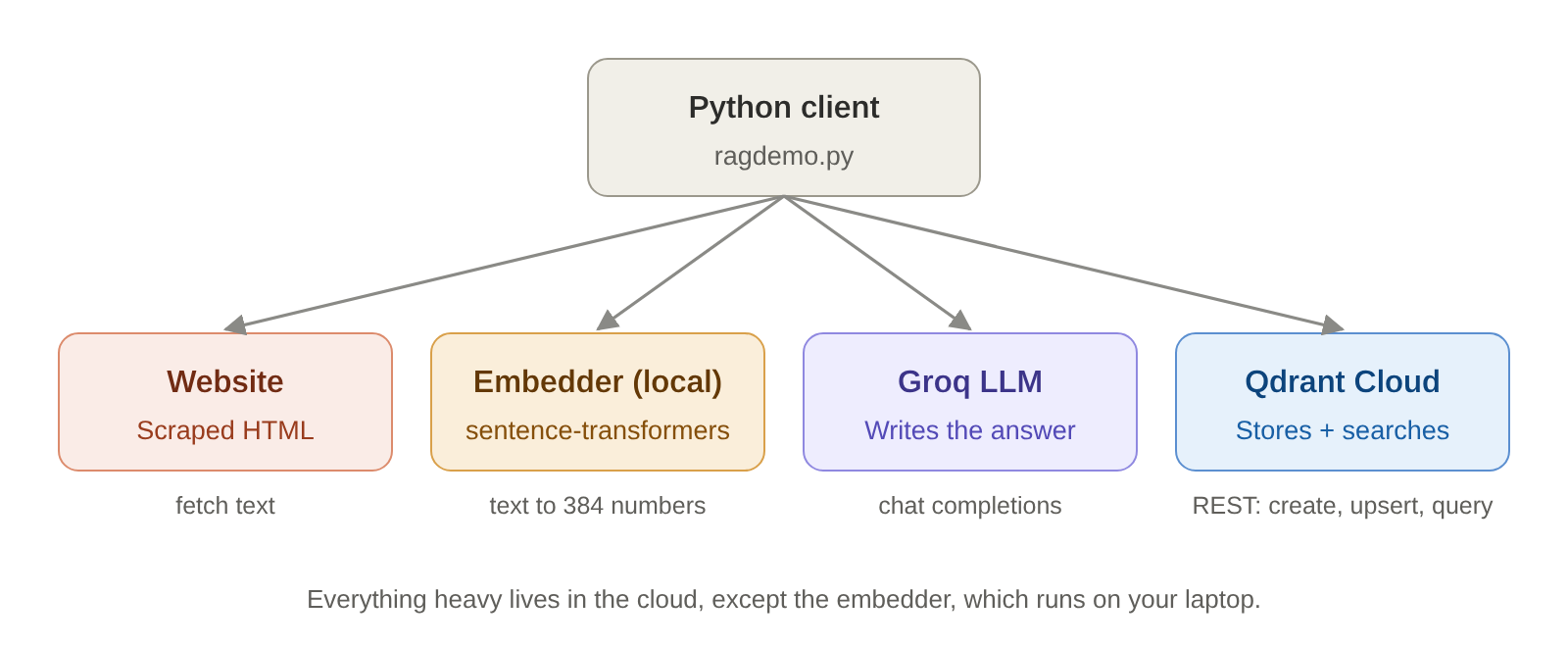
Here is the whole system on one page. Your Python script sits in the middle. It is the only piece that talks to everyone else. It reads the website, it asks the embedder on your own machine to turn text into numbers, it sends those numbers to your Qdrant cluster, and it sends the final prompt to Groq.
Notice that the pieces never talk to each other directly. Qdrant does not know Groq exists. The website does not know about Qdrant. That keeps things simple. If you want to swap one piece later, say a different LLM, you only change the script.
Part 3: Step-by-Step Implementation
Step 1: Get your free credentials
Qdrant: sign up at cloud.qdrant.io, create a free cluster, then copy the Cluster URL (it looks like https://xxxx.cloud.qdrant.io:6333) and create an API key.
Groq: sign up at console.groq.com and create an API key under API Keys.
Step 2: Install the dependencies
python -m pip install requests sentence-transformers beautifulsoup4Using python -m pip guarantees the packages are installed into the same Python interpreter that will run your script. This avoids one of the most common beginner problems, covered in the troubleshooting section below. Note that sentence-transformers pulls in PyTorch, so the install can take a few minutes.
Step 3: Imports and configuration
Create a file called ragdemo.py and start with this:
import re
import uuid
import requests
from bs4 import BeautifulSoup
from sentence_transformers import SentenceTransformer

QDRANT_URL = "https://YOUR-CLUSTER-URL:6333"   # no trailing slash
QDRANT_API_KEY = "YOUR_QDRANT_API_KEY"
GROQ_API_KEY = "YOUR_GROQ_API_KEY"
GROQ_MODEL = "llama-3.3-70b-versatile"   # check Groq's models page if this errors

PROFILE_URL = "https://example-portfolio.com"   # personal site

COLLECTION = "profile_rag"
QDRANT_HEADERS = {"api-key": QDRANT_API_KEY, "Content-Type": "application/json"}

embedder = SentenceTransformer("all-MiniLM-L6-v2")
VECTOR_SIZE = 384
What each part does: Qdrant authenticates every request through an api-key header. The embedding model is downloaded once (about 80 MB) and cached. VECTOR_SIZE must equal the model's output size, otherwise Qdrant will reject your vectors with a dimension error. Replace the placeholder URLs with real ones before running.
Step 4: Write the chunking helper
def chunk_text(text, size=150, overlap=30):
    """Split text into ~150-word chunks that overlap by 30 words."""
    words = text.split()
    chunks = []
    step = size - overlap
    for i in range(0, len(words), step):
        piece = " ".join(words[i:i + size])
        if len(piece.split()) > 20:      # skip tiny leftovers
            chunks.append(piece)
    return chunks
The function slides a window of 150 words across the text, moving forward 120 words each time, so consecutive chunks share 30 words. Chunks shorter than 20 words are dropped because they carry too little meaning to be useful.
Sequence: What Happens During One Ingestion Run
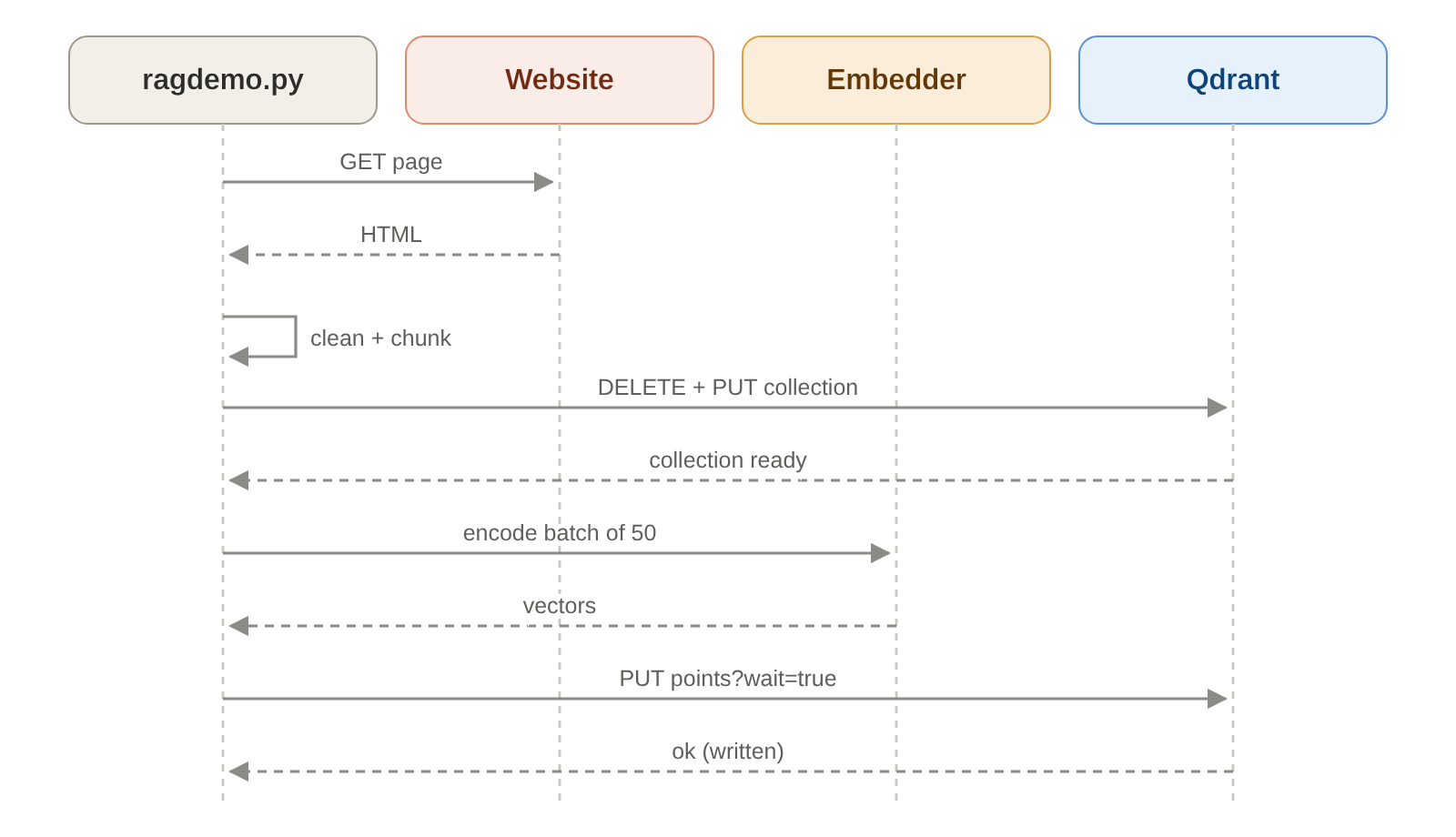
Before we write Steps 5 and 6, here is the order in which things happen. Read it from top to bottom. A solid arrow is a request. A dashed arrow is the reply.
First the script fetches the website and cleans it into chunks. Only after all the text is ready does it touch Qdrant. It wipes and recreates the collection, sends batches of 50 chunks to the embedder, and stores each batch in Qdrant. Qdrant waits until the data is written before it says ok.
Step 5: Load the personal website
def load_website(url):
    headers = {"User-Agent": "Mozilla/5.0 (RAG tutorial bot)"}
    r = requests.get(url, headers=headers, timeout=20)
    r.raise_for_status()

    soup = BeautifulSoup(r.text, "html.parser")
    for tag in soup(["script", "style", "nav", "footer", "noscript"]):
        tag.decompose()                  # remove non-content parts

    text = re.sub(r"\s+", " ", soup.get_text(" ")).strip()
    return [{"text": c, "source": url} for c in chunk_text(text)]
We download the page, delete scripts, styles, menus and footers, collapse whitespace, and chunk what remains. Every chunk stores the URL it came from in a source field. That field lets the final answer point back to where a fact originated, which makes the system far more trustworthy.
Step 6: Create the collection and store the vectors (API calls 1 and 2)
def reset_collection():
    requests.delete(f"{QDRANT_URL}/collections/{COLLECTION}", headers=QDRANT_HEADERS)
    r = requests.put(
        f"{QDRANT_URL}/collections/{COLLECTION}",
        headers=QDRANT_HEADERS,
        json={"vectors": {"size": VECTOR_SIZE, "distance": "Cosine"}},
    )
    r.raise_for_status()
    print("Collection ready")


def upsert_documents(docs, batch_size=50):
    for i in range(0, len(docs), batch_size):
        batch = docs[i:i + batch_size]
        vectors = embedder.encode([d["text"] for d in batch]).tolist()
        points = [
            {
                "id": str(uuid.uuid4()),
                "vector": vec,
                "payload": {"text": d["text"], "source": d["source"]},
            }
            for d, vec in zip(batch, vectors)
        ]
        r = requests.put(
            f"{QDRANT_URL}/collections/{COLLECTION}/points?wait=true",
            headers=QDRANT_HEADERS,
            json={"points": points},
        )
        r.raise_for_status()
    print(f"Stored {len(docs)} chunks")
A collection is like a table in a normal database. Cosine distance measures how similar the direction of two vectors is, which works well for text embeddings. We delete and recreate the collection on each ingest so repeated runs do not pile up duplicate data.
Each stored item is a point: an ID (Qdrant requires an integer or UUID), the vector, and a payload holding the original text and its source. Points are uploaded in batches of 50 to keep requests small. The wait=true flag makes Qdrant confirm the data is written before replying.
Sequence: What Happens When Someone Asks a Question
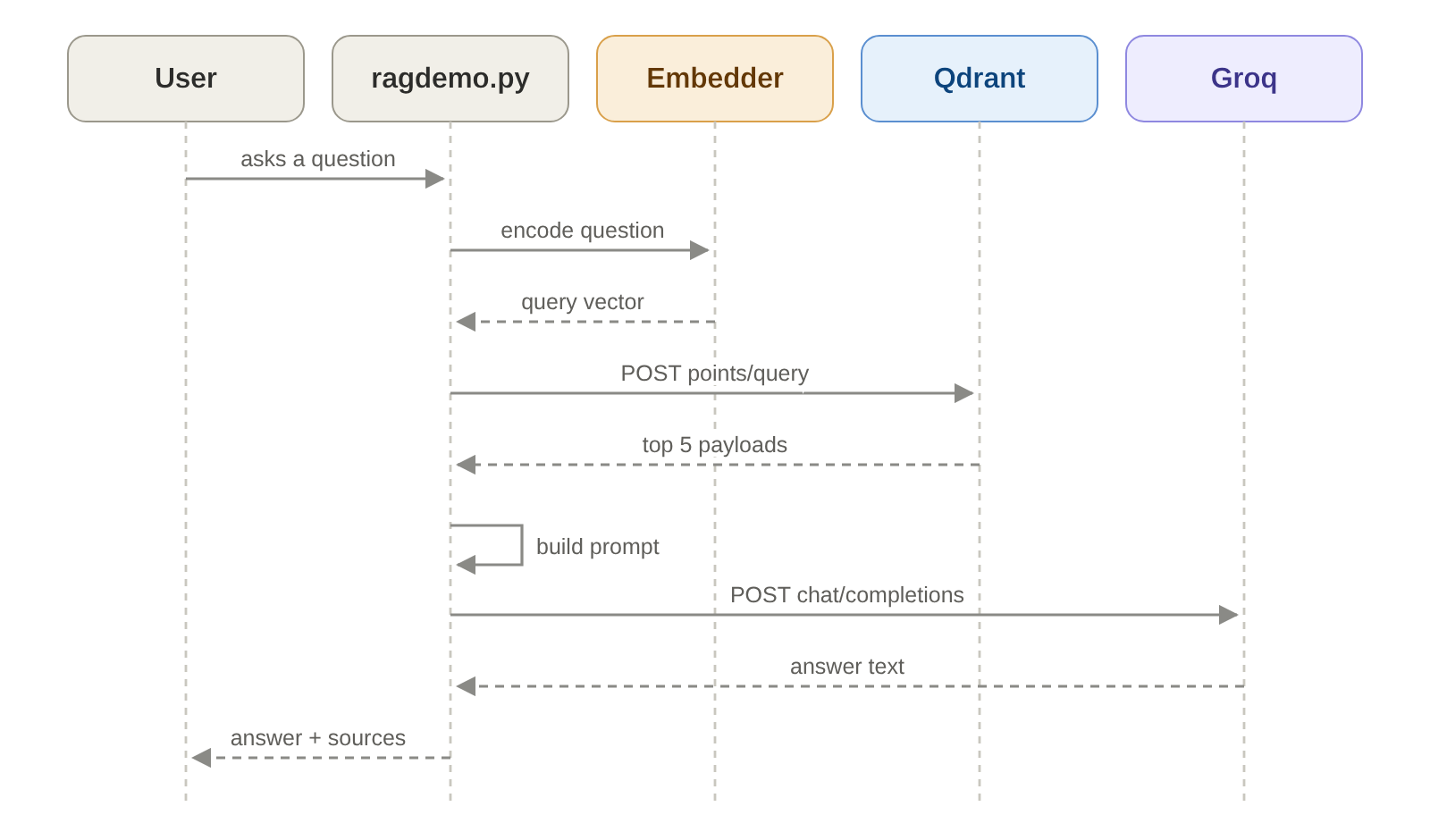
This is the part that runs every time. It is shorter than ingestion, and that is the point. All the slow work was done earlier.
The user asks a question. The script turns it into a vector with the same embedder. It sends that vector to Qdrant and gets back the five closest chunks, with their text and source. The script then builds one prompt from the question and those chunks and sends it to Groq. Groq replies with the answer, and the script shows it to the user. Steps 7 and 8 below are the code for exactly this.
Step 7: Search for relevant chunks (API call 3)
def search_qdrant(question, top_k=5):
    query_vector = embedder.encode(question).tolist()

    url = f"{QDRANT_URL}/collections/{COLLECTION}/points/query"
    payload = {
        "query": query_vector,
        "limit": top_k,
        "with_payload": True,
    }
    r = requests.post(url, headers=QDRANT_HEADERS, json=payload)
    r.raise_for_status()

    points = r.json()["result"]["points"]
    return [p["payload"] for p in points]    # full dict: text + source
The question is embedded with the same model used for the documents, and Qdrant returns the five closest stored vectors. The function returns the full payload dictionaries (not only the text) so the next step can cite sources. top_k is a tuning knob: raise it if answers miss information, lower it if the model gets distracted by irrelevant chunks.
Step 8: Ask the LLM (API call 4)
def ask_llm(question, hits):
    context = "\n".join(f"- {h['text']} (source: {h['source']})" for h in hits)

    messages = [
        {"role": "system", "content": (
            "You answer questions about a person using ONLY the provided context "
            "from their website. If the answer is not in the context, "
            "say you couldn't find it. Mention the source URL when useful."
        )},
        {"role": "user", "content": f"Context:\n{context}\n\nQuestion: {question}"},
    ]

    r = requests.post(
        "https://api.groq.com/openai/v1/chat/completions",
        headers={"Authorization": f"Bearer {GROQ_API_KEY}",
                 "Content-Type": "application/json"},
        json={"model": GROQ_MODEL, "messages": messages, "temperature": 0.2},
    )
    r.raise_for_status()
    return r.json()["choices"][0]["message"]["content"]


def rag(question):
    hits = search_qdrant(question)
    return ask_llm(question, hits)
This is the "augmented generation" half of RAG. The retrieved chunks are pasted into the prompt, and the system message restricts the model to that context. A low temperature (0.2) keeps the answers factual instead of creative. Because Groq follows the OpenAI chat format, switching to another provider later usually means changing only the URL, key and model name.
Step 9: Run everything
if __name__ == "__main__":
    print("Starting...")

    # --- Ingest (run once) ---
    docs = []
    docs += load_website(PROFILE_URL)
    print(f"Collected {len(docs)} chunks")

    reset_collection()
    upsert_documents(docs)

    # --- Ask questions ---
    questions = [
        "Who is this person and what do they do?",
        "Which programming languages do they use most?",
        "What projects have they built?",
        "How can I contact them?",
    ]
    for q in questions:
        print(f"\nQ: {q}")
        print("A:", rag(q))
Run it from the folder containing the file:
python ragdemo.pyOn the first run the embedding model downloads, which takes a minute. After one successful ingest, comment out the ingest lines (docs = [] through upsert_documents(docs)) so later runs only ask questions; the data already lives in Qdrant.
Part 4: Troubleshooting Real Errors
These are the errors people most often meet when running this project, including ones that came up while building it.
ModuleNotFoundError: No module named 'requests'. The packages were installed into a different Python than the one running the script. On a Mac with Anaconda it is common to have both the system Python 3.9 and conda's Python. Run which python to see which is active, and install with python -m pip install ... so the packages and the interpreter always match.
NotOpenSSLWarning ... LibreSSL 2.8.3. This is a warning, not an error. The macOS system Python is built against LibreSSL, which the newer urllib3 dislikes. It normally still works. Switching to conda's modern Python (use python, not python3) removes it, or you can run python3 -m pip install "urllib3<2".
NameError: name 'BeautifulSoup' is not defined. The import line is missing. Add from bs4 import BeautifulSoup at the top, along with import re.
Collection already exists (HTTP 409). The old create_collection() function is still being called. Using reset_collection() as shown above avoids this, and the message itself is harmless.
Wrong input: vector dimension. The collection size does not match the embedding model. For all-MiniLM-L6-v2 it must be 384.
401 or 403 from Qdrant. The API key is wrong, or the header is not named api-key.
Timeouts. The cluster URL may be missing :6333, or the free cluster may have been paused after inactivity.
model_decommissioned from Groq. Model names change. Pick a current one from Groq's models page and update GROQ_MODEL.
429. You hit the free-tier rate limit. Wait a little or add retry logic.
TypeError: string indices must be integers. You mixed two versions of the code: a search_qdrant that returns plain strings with an ask_llm that expects dictionaries (or the reverse). Keep the pair from this tutorial together.
A good debugging habit is to test retrieval on its own before blaming the LLM:
for hit in search_qdrant("What projects has this person built?"):
    print(hit["text"][:100], "->", hit["source"])
If the retrieved chunks look relevant, retrieval works and any weak answers come from the prompt or model. If they look unrelated, the problem is in ingestion or chunking.
Part 5: Limitations to Know About
- LinkedIn blocks scraping and requires login, and scraping it violates its terms. Copy your own profile text into a .txt file and load it with chunk_text() instead.
- JavaScript-heavy portfolio sites (React or Next.js) often ship almost no text in the raw HTML. Use a headless browser such as Playwright, or paste the text manually.
- Only public data is collected, and you should only index information you are allowed to use.
- Free tiers change. Rate limits, cluster pausing and model availability can differ from what is described here.
- The answer is only as good as the data. If the website says little, the model will correctly say it couldn't find the answer.
To load a pasted text file, add this helper:
def load_text_file(path, source_name):
    with open(path, encoding="utf-8") as f:
        return [{"text": c, "source": source_name} for c in chunk_text(f.read())]

docs += load_text_file("linkedin.txt", "LinkedIn (pasted)")